Delegate
Calls, texts, appointments, and the follow-ups that keep things moving.
Focus on what matters most. Delegate the rest.

01 / Your assistant
Six skills, one personal assistant who knows your context. This is what you're getting.
Calls, texts, appointments, and the follow-ups that keep things moving.
Agendas, live notes, summaries, and next steps from the conversation.
Useful briefs that bring the important details into focus.
Help with simple forms and everyday website tasks, with your approval when it matters.
Find the words for an email, a document, or your next LinkedIn post.
Make room for the relationships behind all those plans and messages.
01 / Your assistant, in action
Finding an electrician isn't one task. It's quotes, missed calls, rescheduled visits, and remembering to follow up. That's the work you can delegate.
A real-life delegation
Explain what you need, your preferences, and what you'd like help arranging.
Quotes, conversations, and next steps stay connected to the delegation.
Review the options and tell your assistant how to proceed.
More than a message draft. Your assistant can call, text, and email.
Give instructions during a call, or join the conversation when needed.
Pick up the thread without piecing the story back together.
01 / How it works
Start with a conversation. Give your assistant the context, then stay as involved as you need to be.
Choose a name and voice, set preferences, and connect the tools you want your assistant to use.
Ask in Sparklets Chat. Quick questions get answers; ongoing work gets its own focused delegation.
Your assistant coordinates the work, checks in for your decisions, and keeps the outcome with the task.
01 / Built to act. Designed for trust.
An AI assistant that does more than answer. Real calls, connected context, and follow-through you can see.
Real calls and texts. Whisper instructions mid-call, or ask to be conferenced in when you want to join.
Calls & texts / Whisper & conferenceKeep preferences and useful context in your Memory Vault. Review and manage what your assistant remembers.
Editable memory / Personal preferencesConnect supported tools like email and calendar. Stay in touch across the web, iPhone, iPad, and Telegram.
Connected tools / Continuous contextChoose what to connect and share. Set permissions and review requests for sensitive actions.
Your permissions / Your decisionsFollow calls and task activity in Live Monitor. Return to the conversation and its next steps.
See Live MonitorName your assistant, choose its voice and persona, and tune the tone from brief to warm.
Voice & persona / Tone controlLive Monitor
Calls and conversations stay connected to the work behind them. See who called, return to a delegation, and keep the next step in view.
On your phone
Step into a call. Catch up on a meeting. Your assistant keeps the context, wherever life takes you.
Next: your peopleJoin in. Stay in the loop.
Notes and next steps.
Anonymized product screens
02 / Your people
The people in your life aren't just contacts. Keep their calls, texts, and shared tasks together, with an assistant that helps carry the coordination.
Family, colleagues, and the people you rely on. Give each relationship a place, with context your assistant can carry forward.
Names, contact details, and content have been edited for privacy.
03 / Your money
A clearer picture of your financial life. Bring accounts, spending, bills, budgets, and investments into view, then look closer at what needs your attention.
Accounts, cards, investments, and your net worth.
Bills, due dates, and budgets for the month ahead.
Spending categories and changes over time.
Connecting Money is not permission for your assistant to move money. Review availability and access details before connecting an account.
Explore MoneyA closer look
A conversation on the web. A quick check on your phone. The same work, kept together.
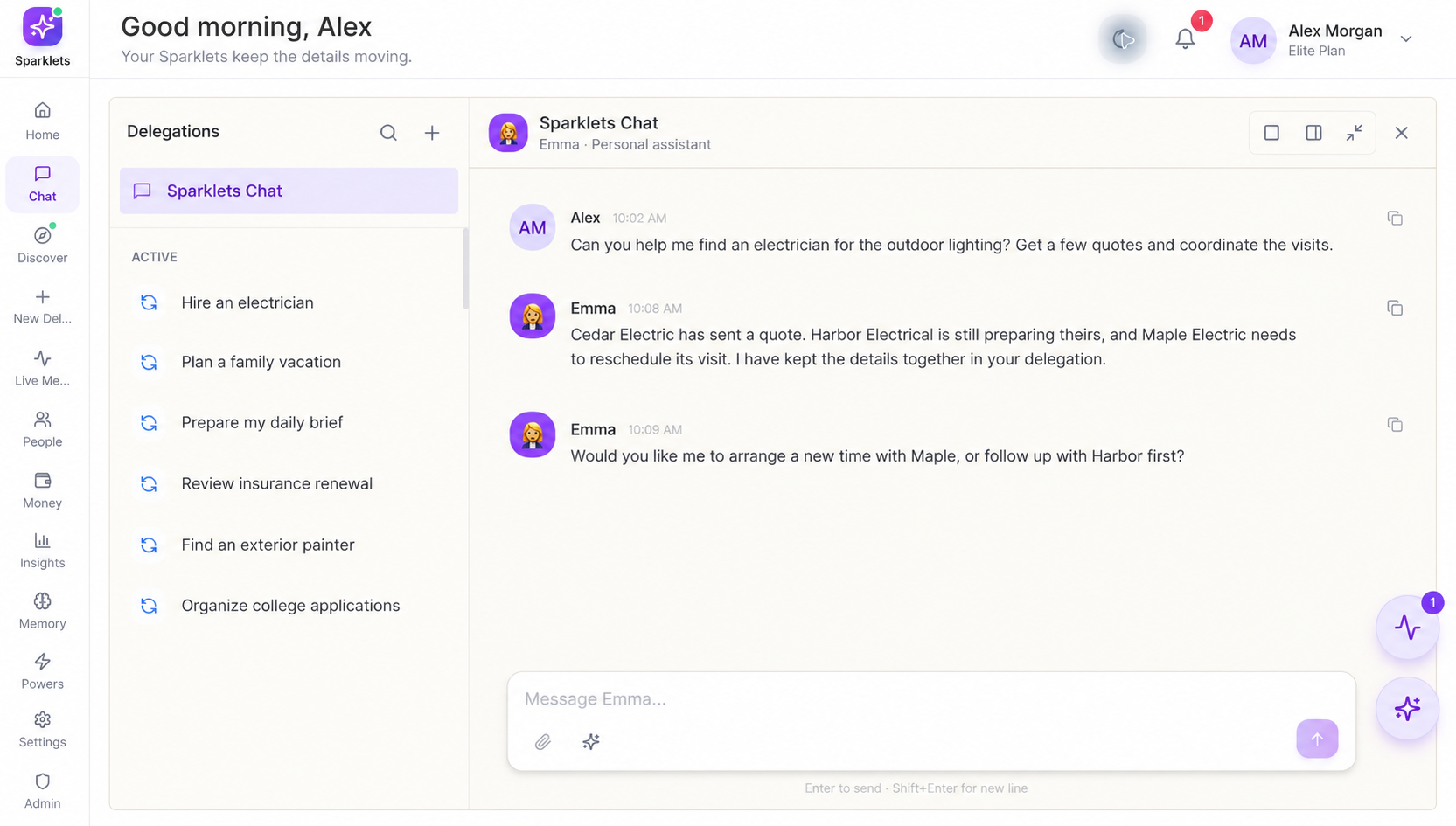
A place to ask, delegate, and stay in the loop.
Privacy & Security
Private by business model, too. No ads. We never sell your data. You pay your assistant, so it answers to you.
You choose what to connect, what to share, and how your assistant works with the people in your life.
Privacy & data practicesConfigure access and review requests for sensitive actions.
Review and edit the information in your Memory Vault.
Follow activity, calls, and task updates in Live Monitor.
Delete your memories, tasks, files, and account. Your data stays yours, including the decision to remove it.
Pricing
Start with financial clarity. Add a little help, or make your assistant part of every day. Choose the level of help you need.
Your financial life, in one place.
$10/ month planned
Financial tools only
Coming soon
Money, plus occasional help.
$30/ month planned
2,000 monthly Sparks
Coming soon
A few things off your plate.
$100/ month
8,000 monthly Sparks
Part of your everyday life.
$150/ month
15,000 monthly Sparks
More of the work, handled.
$250/ month
30,000 monthly Sparks
Room for your busiest life.
$400/ month
50,000 monthly Sparks
USD per month. Sparks are assistant work credits; usage varies with the task. Included Sparks renew monthly.
| Included | Money | Flex | Starter | Pro | Executive | Elite |
|---|---|---|---|---|---|---|
| Monthly price | $10 | $30 | $100 | $150 | $250 | $400 |
| Monthly Sparks | None | 2,000 | 8,000 | 15,000 | 30,000 | 50,000 |
| Availability | Coming soon | Coming soon | Join waitlist | Join waitlist | Join waitlist | Join waitlist |
| Money | Included | Included | Included | Included | Included | Included |
| Personal assistant | Not included | Included | Included | Included | Included | Included |
| Add-on Spark packs | Not applicable | Available | Available | Available | Available | Available |
| Best fit | Financial clarity | Occasional help | A few tasks | Daily delegation | Fuller schedules | Frequent delegation |
Money is included with assistant memberships where available. Standalone Money and Flex memberships are coming soon.
Looking ahead
More ways to lighten the everyday. These are directions we're exploring, not promises of availability or release dates.
Timely reminders and useful context for the relationships that matter.
Broader help with website tasks, travel, and shopping, with clear review points.
Exploring Android and additional messaging channels.
Before you begin
Chat is the starting point. Sparklets can also make calls, send communications, coordinate with people, and keep work in focused delegation threads. Available actions depend on your connections and permissions.
Yes. Sparklets supports conferencing you into calls and receiving instructions during a call. You can stay involved when your input or verification is needed.
Supported email and calendar connections include Google, Microsoft, and iCloud. Choose the connections and permissions appropriate for your needs during setup.
On the web, iPhone, and iPad. You can also talk to your assistant through Telegram. Android is not available yet.
Sparks are work credits. Calls, research, and other assistant activity use them. Assistant plans include a monthly allowance, with optional non-expiring purchased packs for additional work. The Money-only plan does not include Sparks.
Use your account settings and Memory Vault to manage information and permissions. One click deletes your memories, tasks, files, and account. See the privacy policy for processing, retention, and deletion details.
Join the waitlist. When invited, choose an assistant membership,set your preferences, and start with one delegation. Standalone Money and Flex memberships are coming soon.

Your life, a little lighter.